
Direct Debit API
Paga's Direct Debit feature allows businesses to securely debit customer bank accounts without cards. Using the Collect API, you can tokenize accounts and automate charges. It is perfect for recurring billing (e.g., subscriptions).
Prerequisites
Before integrating:
- You must have a verified Paga Business Account → Sign up or log in.
- You need your:
- Public Key
- Secret Key
- HMAC (hash key)
from your business account.
- Your business IP Address must be whitelisted to access the Collect API → IP Whitelist.
Base URLs
| Environment | URL |
|---|---|
| Live | https://collect.paga.com |
| Test | https://beta-collect.paga.com |
Important Notes
- All operations are asynchronous, rely on callback notifications to avoid unnecessary polling and rate limits.
- The
accountReferenceserves as your token identifier. Ensure it is properly mapped to your account information.
Direct Debit Flow
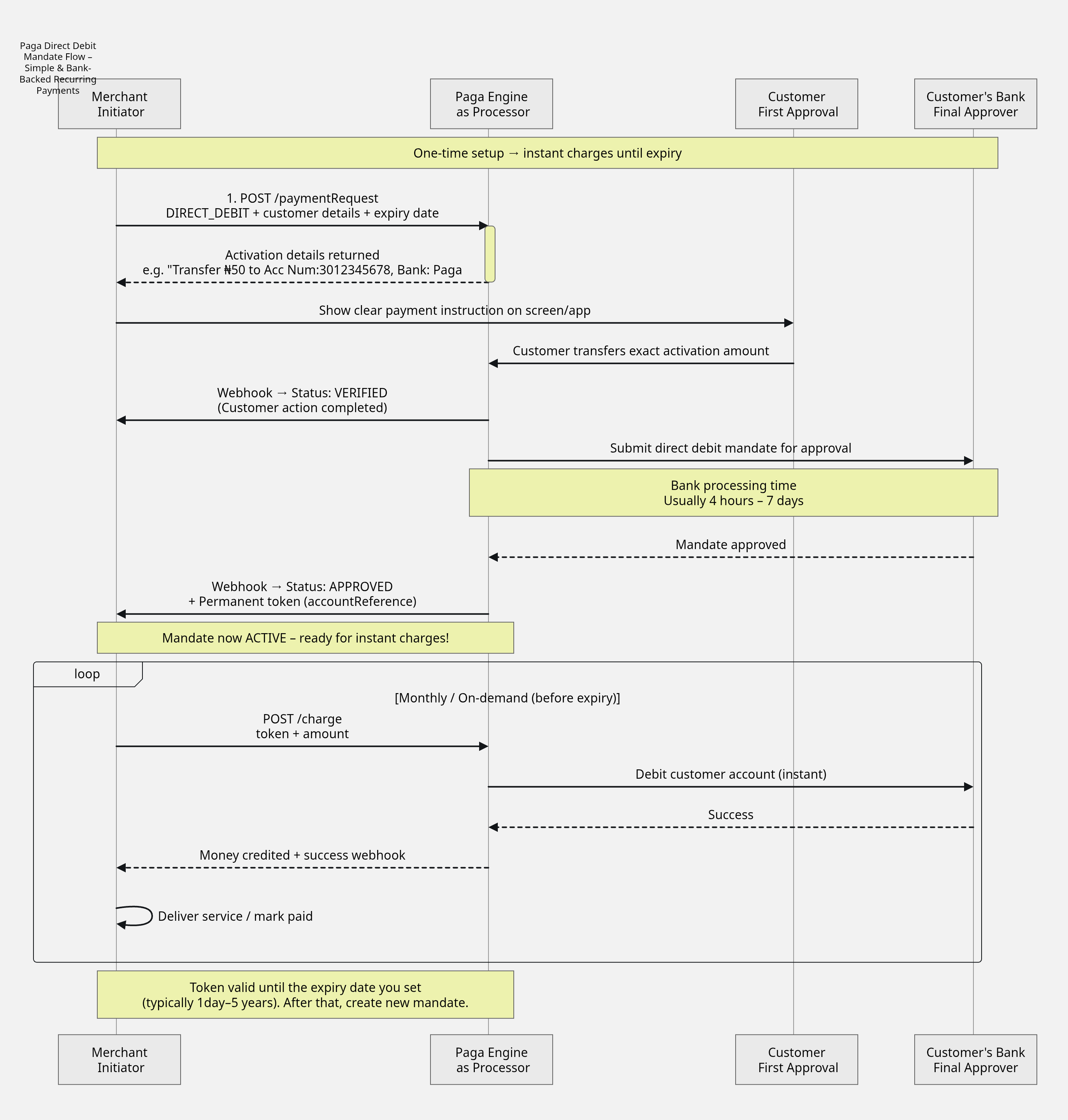
API Endpoints
1. Tokenization (Direct Debit Authorization)
Endpoint:POST /paymentRequest
This endpoint initiates the bank account tokenization process. Merchants must provide all required parameters to receive the bank account for tokenization.
Required Parameters
| Parameter | Type | Description | Mandatory |
|---|---|---|---|
referenceNumber | String | Unique transaction refence identifying the tokenisation attempt. This | True |
amount | Double | This should be upper limit of the charge per transaction you'll be debiting from the customer account. You can charge this amount or less but not more than the stated amount (e.g., To charge less than the amount specified, parse | True |
currency | String | ISO currency code ("NGN") | True |
accountReference | String | Your internal ID for customer. This is the reference that will be used after tokenisation is approved to charge the customer account. | True |
isSingleUse | Bolean | If the token is meant to used for more than 30 days, specify this as false. The default value is true | False |
payer.name | String | Customer's name | True |
payer.phoneNumber | String | Customer's phone number | True |
payer.email | String | Customer's email address | True |
payer.address | String | Registered address (with bank) | True |
payer.bankId | String | Customer’s bank UUID (from getBank endpoint) | True |
payer.bankAccountNumber | String | NUBAN - 10 digit account number | True |
payee.name | String | Your business name (e.g., "Spotify") | True |
expiryDateTimeUTC | String | The expiry timestamp of the token that's generated. The maximum allowed validity is 5year for the token generated. | True |
isAllowPartialPayments | String | Specify as true if you'll like to charge less than the amount specified. The default value is false | True |
callBackUrl | String | Notification URL - this is where we will notify you once mandated is created, approved for charge and payment on each mandate created | True |
paymentMethods | List | Always set as ["DIRECT_DEBIT"] | True |
Hash Format
SHA-512(referenceNumber + amount + currency + payer.phoneNumber + payer.email + hashKey)Sample Request
POST /paymentRequest HTTP/1.1
Content-Type: application/json
Accept: application/json
Authorization: "Basic base64(public Key:secret Key)"
hash: SHA-512(referenceNumber + amount + currency + payer.phoneNumber + payer.email + hashkey)

{
    "referenceNumber": "23534645426456560003",
    "amount": "200",
    "currency": "NGN",
    "accountReference": "00203028248808300003",
    "payer": {
        "name": "John Bull",
        "phoneNumber": "08063333189",
        "email": "[email protected]",
		"address": "176 Herbert Macualey Yaba",
        "bankId": "824d4b53-2752-49bb-b84a-20b69bb897ef",
        "bankAccountNumber": "9197546471"

    },
    "payee": {
        "name": "Test Merchant"
    },
    "isSingleUse": false,
    "expiryDateTimeUTC": "2030-11-25T00:00:00",
    "payerCollectionFeeShare": 0.0,
    "payeeCollectionFeeShare": 1.0,
    "isAllowPartialPayments": true,
    "callBackUrl": "https://webhook.site/43874389389389328huwr378",
    "paymentMethods": [
        "DIRECT_DEBIT"
    ]
}
Sample Response
{
    "referenceNumber": "23534645426456560003",
    "statusCode": "0",
    "statusMessage": "success",
    "requestAmount": 200.0,
    "totalPaymentAmount": 200.0,
    "paymentMethods": [
        {
            "name": "DIRECT_DEBIT",
            "properties": {
                "activationAmount": "N50.00",
                "accountReference": "00203028248808300003",
                "activationAccountNumber": "9880218357",
                "activationBankName": "Paystack-Titan"
            }
        }
    ],
    "expiryDateTimeUTC": "2030-11-25T00:00:00",
    "isPayerPagaAccountHolder": true,
    "bankName": "Paga"
}
Post-Tokenization Steps
- The response includes an activation account number and activation Bank Name
- Customer must transfer activation amount from the registered bank account specified in the payment request
- Once the transfer is received and confirmed, Paga will send a callback notification with
VERIFIEDstatus - The
VERIFIEDstatus is a confirmation of customer approval, the next step is for the bank to approve (This takes between 4hrs and 7 days). - Once the Bank approved the mandate, a second callback will be sent by Paga with
APPROVEDstatus
Sample Callback
{
  "statusCode": "004",
  "statusMessage": "VERIFIED",
  "accountReference": "acctreference10999",
  "hash": "41ae86e54981b8583baad1f5615b8b3426cec30e87ce95c74ef57725b21e2221413ff38692b7179809b696cc9c14188cf28c78d6e9157379505fa92db7168606",
  "event": "Tokenization",
  "notificationId": "acctreference10999",
  "timeStamp": "2026-01-26T13:27:05.419252186Z",
  "customerEmail": "[email protected]",
  "customerPhoneNumber": "08032817205",
  "bankName": "GT Bank",
  "accountNumber": "0697122703",
  "currency": "NGN",
  "mandateStatus": "VERIFIED",
  "referenceNumber": "reference10999"
}
{
"statusCode": "0",
"statusMessage": "APPROVED",
"accountReference": "acctreference10999",
"hash": "41ae86e54981b8583baad1f5615b8b3426cec30e87ce95c74ef57725b21e2221413ff38692b7179809b696cc9c14188cf28c78d6e9157379505fa92db7168606",
"event": "Tokenization",
"notificationId": "acctreference10999",
"timeStamp": "2026-01-26T13:27:05.419252186Z",
"customerEmail": "[email protected]",
"customerPhoneNumber": "08032817205",
"bankName": "GT Bank",
"accountNumber": "0697122703",
"currency": "NGN",
"mandateStatus": "APPROVED",
"referenceNumber": "reference10999"
}Fetch Tokenization Status
Endpoint:POST /status
This endpoint is used to pull the status of the mandate using the payment request referenceNumber.
Request Parameter
| Parameter | Type | Description | Required |
|---|---|---|---|
referenceNumber | String | Unique reference from tokenization request | Yes |
Response Parameter
| Field | Description |
|---|---|
referenceNumber | Reference ID for the status request |
statusCode | Status code of this request (e.g., "0" = success). This only an indication of response from Paga not indication of the mandate status |
statusMessage | Message describing the status (e.g., "success") |
data.referenceNumber | Original tokenization reference number |
data.statusCode | Status of the tokenization request |
data.statusMessage | Message for the tokenization request status |
data.requestAmount | Original amount set during tokenization. This is the maximum single transaction amount you can charge. |
data.totalPaymentAmount | Total expected payment amount (with fees) |
data.expiryDateTimeUTC | Expiration time of the mandate/token |
data.mandate.ProcessStatusId | Mandate ProcessStatusId can either be PENDING, VERIFIED, APPROVED, REJECTED |
data.mandate.statusMessage | Mandate-specific status message (e.g., "success") |
data.mandate.accountReference | Your internal ID for mandate identifying the target customer |
data.mandate.createdDateTimeUTC | Date and time when the mandate was created |
SHA-512(referenceNumber + hashKey)POST /status HTTP/1.1
Host: collect.paga.com
Authorization: Basic base64(publicKey:secretKey)
hash: SHA-512(referenceNumber + hashKey)
Content-Type: application/json
{
"referenceNumber": "ed0952c6-da54-402d-830d-97b49f083159",
"accountReference":"00203028083802029"
}
Sample Response
{
    "referenceNumber": "ed0952c6-da54-402d-830d-97b49f083159",
    "statusCode": "0",
    "statusMessage": "success",
    "data": {
        "referenceNumber": "23534645426456560003",
        "statusCode": "1",
        "statusMessage": "pending",
        "requestAmount": 200.0,
        "totalPaymentAmount": 200.0,
        "paymentMethods": [
            {
                "name": "DIRECT_DEBIT",
                "properties": {}
            }
        ],
        "expiryDateTimeUTC": "2030-11-24T23:00:00",
        "isPayerPagaAccountHolder": false,
        "additionalData": {
            "mandate": [
                {
                    "ProcessStatusId": "VERIFIED",
                    "accountReference": "00203028248808300003",
                    "StatusMessage": null,
                    "CreatedDateTimeUTC": 1764156371443
                }
            ]
        }
    }
}
Mandate Authorization Status meanings
| statusCode | Meaning | Description |
|---|---|---|
| 003 | Pending mandate authorization | The mandate has been created but is not yet authorized. |
| 004 | Mandate authorization verified | The mandate has been successfully authorized. |
| 005 | Mandate authorization rejected | The authorization request was declined. |
| 006 | Unknown mandate authorization status | The processor cannot confirm the authorization status. |
| 007 | Mandate not found | No mandate exists for the details provided. |
| 0 | Successful mandate Approval | The mandate is ready to be charged. |
Approved Channels for e-Mandate Activation
All e-mandate activation payments must be completed through NIBSS-approved activation channels to ensure successful authorisation and activation.
NIBSS Approved Activation Channels
- Mobile Banking Application: The customer can log in to their official bank app to approve the pending mandate request.
- Internet Banking: Activation via their bank’s secure web portal.
- Bank Branch (Teller): Customers may visit a physical bank location to make the payment.
Non-Supported Channels
- POS (Point of Sale) Terminals
- USSD Codes (e.g., *xxx#)
- ATM Dashboards
Note: If a customer attempts to authorise a mandate via a non-supported channel, the mandateStatus will remain "PENDING" and a callback will not be triggered until an approved channel is used. We recommend displaying these supported channels within your UI to guide the user during the checkout process.
2. Charge (Direct Debit Charge)
Endpoint:POST /chargeDebitMandate
This endpoint debits a customer’s bank account after tokenization has been approved. It is used for recurring or one-time charges on a tokenized account.
Required Parameters
| Parameter | Description |
|---|---|
referenceNumber | Unique transaction reference number identifying the charge |
amount | Amount to charge from the customer's bank account |
accountReference | This is the account reference previously approved during tokenisation step |
Hash Format
SHA-512(referenceNumber + amount + accountReference + hashKey)Sample Request
POST /chargeDebitMandate HTTP/1.1
Host: collect.paga.com
Authorization: Basic base64(publicKey:secretKey)
hash: sha512referenceNumber + amount + accountReference + hashKey)
Content-Type: application/json

{
  "referenceNumber": "2353464564565",
  "amount": 600.0,
  "accountReference": "00203028248808300003"
}
Sample Response
{
  "referenceNumber": "2353464564565",
  "statusCode": "0",
  "statusMessage": "Successful"
}
Post-Charge Notification
Once the charge is processed, a callback notification will confirm the status of the charge.
Sample Callback
{
    "event": "Charge_Complete",
    "notificationId": "e68545b8-358c-4b72-9ac1-0471008617e7",
    "statusCode": "0",
    "qmount": 600.00,
    "referenceNumber": "2353464564565",
    "processStatusId": "SUCCESSFUL",
    "accountReference": "00203028248808300003",
    "destinationBankAccountNumber": "3172860834",
    "destinationBankName": "Paga",
    "sourceBankName": "Providus Bank",
    "sourceBankAccountNumber": "9197546471",
    "senderName": "John Mark"
}
4. Check Charge Status
Endpoint:POST /getChargeMandateStatus
This endpoint is used to check the status of the charge using the charge referenceNumber.
Request Parameter
| Parameter | Type | Description | Required |
|---|---|---|---|
referenceNumber | String | Unique reference from charge request | Yes |
Response Parameter
| Field | Description |
|---|---|
referenceNumber | Reference ID for the status request |
statusCode | Status code of the overall request (e.g., "0" = success) - see statusCode mapping here |
statusMessage | Message describing the status (e.g., "success") |
data.referenceNumber | Original tokenization reference number |
data.statusCode | Status of the tokenization request |
data.statusMessage | Message for the tokenization request status |
data.requestAmount | Original amount set during tokenization. This is the maximum single transaction amount you can charge. |
data.totalPaymentAmount | Total expected payment amount (with fees) |
data.expiryDateTimeUTC | Expiration time of the mandate/token |
data.mandate.statusCode | Mandate-specific status code (e.g., "0" = success, 1 = pending, -3 = request_cancelled) |
data.mandate.statusMessage | Mandate-specific status message (e.g., "success") |
data.mandate.accountReference | Your internal ID for mandate |
data.mandate.createdDateTimeUTC | Date and time when the mandate was created |
SHA-512(referenceNumber + hashKey)Charge Status Request
POST /getChargeMandateStatus HTTP/1.1
Host: collect.paga.com
Authorization: Basic base64(publicKey:secretKey)
hash: SHA-512(referenceNumber + hashKey)
Content-Type: application/json

{
  "referenceNumber": "ed0952c6-da54-402d-830d-97b49f083159",
}
Charge Status Response
{
    "referenceNumber": "ed0952c6-da54-402d-830d-97b49f083159",
    "statusCode": "0",
    "statusMessage": "SUCCESS",
    "data": {
 				"statusCode": "0",
        "Amount": 2,
        "ReferenceNumber": "23534645426456560003",
        "ProcessStatusId": "SUCCESSFUL",
        "bankAccountTokenExternalReference": null,
        "destinationBankAccountNumber": "3172860834",
        "destinationBankName": "Paga",
        "sourceBankName": "Providus Bank",
        "sourceBankAccountNumber": "9197546471",
        "senderName": "John Mark"
    }
}
Mandate Charge status meaning
| statusCode | Meaning | Description |
|---|---|---|
| 1 | Pending mandate charge | The mandate charge has been requested but is not yet completed. |
| 0 | Successful mandate charge | The mandate charge was completed successfully. |
| -1 | Invalid mandate charge | The mandate charge failed because it was invalid (for example: wrong details, expired mandate, or usage exceeded). |
| -4 | Unknown mandate charge status | The processor could not determine the status of the mandate charge (system issue or unclear result) |
5. Disable Mandate
Endpoint:POST /disableMandate
Hash
SHA-512(referenceNumber + accountReference + hashKey)Disable Mandate Request
POST /disableMandate HTTP/1.1
Host: collect.paga.com
Authorization: Basic base64(publicKey:secretKey)
hash: SHA-512(referenceNumber + hashKey)
Content-Type: application/json

{
  "referenceNumber": "ed0952c6-da54-402d-830d-97b49f083159",
	"accountReference":"00203028083802029"
}
Disable Mandate Response
{
    "statusCode": "0",
    "statusMessage": "success",
    "referenceNumber": "ed0952c6-da54-402d-830d-97b49f083159",
    "data": null
}
Updated 3 months ago